

Before importing IT equipment to your new customer in Brazil, you must establish whether they have a RADAR authorisation.
That’s because it doesn’t matter how well your equipment meets the technical requirements and quality standards before shipping. If the importing company doesn’t have a RADAR licence, your shipment may be delayed or held at customs.
And without a clear understanding of the RADAR and how it works, it’s easy to overlook one of the most important import compliance requirements.
Also, as a new importer, you can easily confuse RADAR with other requirements such as an import licence, INMETRO Certification, Siscomex, and NCM code.
So, what exactly is RADAR? Who needs it? Why is it required? How do you obtain it when importing into Brazil? And how does it relate to Siscomex, INMETRO, and the NCM codes?
To provide clarity and help you stay compliant, Blackthorne IOR answers these questions, including everything else you need to know about RADAR in Brazil.
Let’s dive in!
The RADAR (Registro e Rastreamento da Atuação dos Intervenientes Aduaneiros) is an authorisation issued by the Brazilian Federal Revenue Service (Receita Federal) that allows companies and individuals to carry out import and export operations.
The licence enables Receita Federal to monitor foreign trade activities, assess importers’ financial capacity, and reduce customs fraud and tax evasion through the Siscomex system.
Once approved, you can access Brazil’s foreign trade system (Siscomex) to fulfil the customs clearance instructions for your imports and exports. These include NCM code classifications, customs declarations, and customs clearance.
Without RADAR, you cannot legally import or export commercial goods through Brazil’s customs system.
Although RADAR is a key requirement for importing into Brazil, it plays a different role from that of an import licence, INMETRO Certification, Siscomex, and the NCM code.
Here is a table that defines each of these import requirements, highlighting its role and when it’s needed:
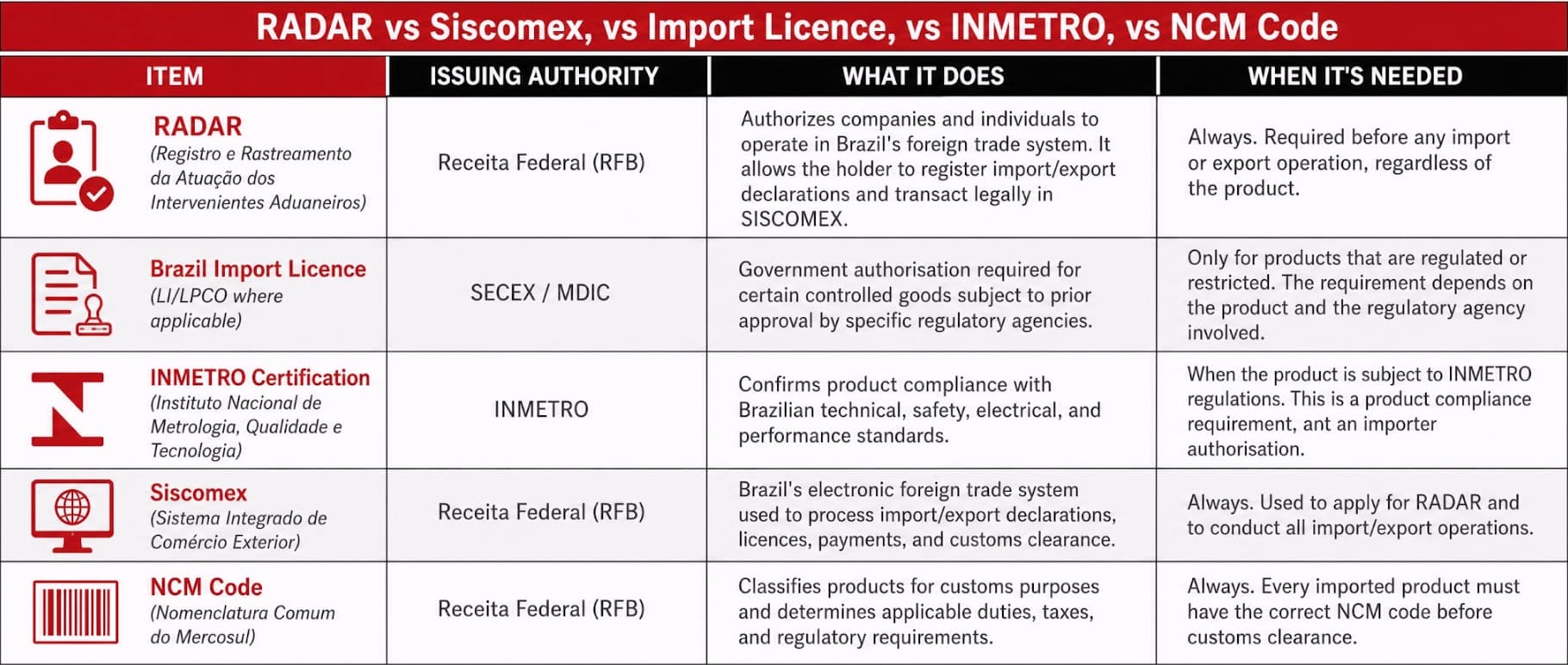
Essentially, when importing IT equipment into Brazil, the first thing you must do is classify the equipment under the correct NCM code.
The NCM code is an 8-digit customs classification code that determines import requirements, including applicable duties and taxes.
Part of the import requirements includes an import licence and INMETRO Certification, alongside other requirements such as the ANATEL approval.
To legally import the equipment and meet all import requirements, you will need to register for RADAR through the Siscomex system. Once RADAR-approved, you can fulfill import requirements via the system.
If unsure whether you need RADAR, here is a summary of the three key parties who must fulfil RADAR requirements when importing or exporting to Brazil:
Brazilian legal entities (Pessoa Jurídica) importing commercial items must obtain RADAR, including:
Foreign companies who have established legal subsidiaries in Brazil also need to register their own RADAR.
You must obtain RADAR if you are an individual (Pessoa Física) engaged in an authorised commercial or professional activity that requires imported goods.
For instance, a self-employed entrepreneur importing products for sale to customers.
Third-party entities and professionals acting on behalf of importers or exporters, such as importers of record and customs brokers (despachantes aduaneiros), require RADAR.
Before applying, it’s important to understand the criteria Receita Federal uses to approve you into their trade system.
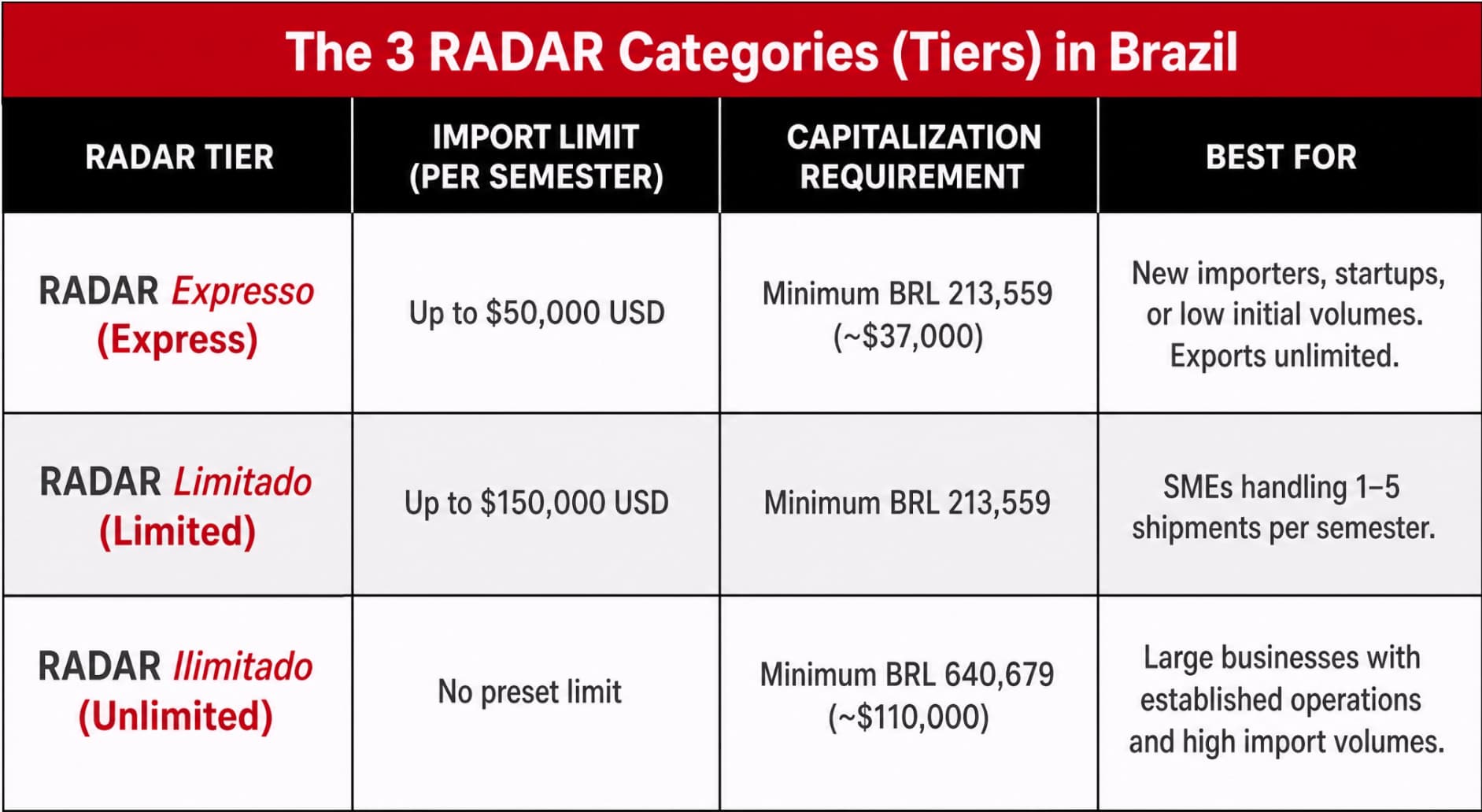
Here are the three RADAR modalities, together with their requirements:
The RADAR Expresso is the entry-level tier designed for companies with minimal initial import volumes. It grants access to the Siscomex system with a semester (6-month-period) import volume of up to $50,000 USD.
Exports, however, remain unlimited, making the licence attractive for companies exploring new markets without committing to high-volume operations.
To qualify for the Express tier, your company must have a minimum capitalisation of BRL 213,559 (approximately $37,000 USD).
RADAR Limitado serves small to medium-sized businesses (SMEs) that have exceeded the Express import cap but have yet to achieve unlimited import volumes.
The semester import volume increases to $150,000 USD, with a capitalisation requirement of BRL 213,559.
With RADAR Limited, you must demonstrate a stable operational history and provide evidence of your capacity to sustain regular imports.
The RADAR Ilimitado is intended for businesses with substantial import operations and high import volumes. There is no preset import limit, allowing companies to conduct unlimited imports and exports within a semester.
To obtain the unlimited RADAR, you must demonstrate a minimum capitalisation of BRL 640,679 (approximately $110,000 USD). You must also provide extensive documentation, including audited financial statements and proof of substantial equity.
While you can apply for your desired licence tier, Receita Federal determines the most appropriate RADAR tier for your business based on your company’s:
Here is a table comparison you can refer to when anticipating the level of authorisation your business is likely to qualify for:
Note: You may come across older resources that refer to the Simplified, Ordinary, Restricted, and Special RADAR categories. These categories are no longer in use and have been replaced by the current Express, Limited, and Unlimited tiers.
To obtain RADAR authorisation, you submit an application to Receita Federal for review. During the evaluation, the authority assesses your financial capacity and business profile to determine the appropriate RADAR category.
Here is a step-by-step guide to the entire RADAR application process:
Verify that required business information is accurate and up to date. The required information and documentation include:
Receita Federal uses this information to verify your legal status and eligibility to conduct foreign trade activities.
Submit your application electronically through the Portal Único Siscomex. You will need to sign in using the Gov.br account or your company’s digital certificate (e-CNPJ).
Once signed in, you can submit a RADAR request within the Habilitar Empresa module as follows: Habilitar Empresa > Cadastro de Intervenientes > Habilitação > Requerer Habilitação.
After submitting the required information, the system automatically retrieves the businesses linked to your CNPJ so you can select the entity applying. You can then choose the desired habilitation modality (category) and submit for review.
Receita Federal evaluates your financial capacity and profile to determine if you qualify for Express, Limited, or Unlimited RADAR.
The system may approve you automatically, or you may have to wait a few more days for manual review, depending on your requested category.
Once approved, the RADAR licence remains active for up to 18 months, after which you can renew it.
Your application may fail to go through or be rejected due to avoidable mistakes.
Here are the common mistakes and how to avoid them:
The RFB automatically cross-references your corporate addresses across multiple municipal, federal, and state databases. If they don’t match, your application cannot go through.
Before applying, audit your corporate documents to ensure the addresses are accurate and consistent.
Tax inspectors conduct random site visits to verify that your business is legitimate.
If you registered your import business at a virtual office, a shared coworking space, or a residential office that lacks the capacity to receive, store or manage commercial cargo, your address will be flagged due to Factual Non-Existence (Inexistência de Fato).
To avoid flagging and suspension, ensure your registered corporate address physically matches your operational reality. If you use a third-party logistics (3PL) warehouse, legally declare and document your fulfillment contracts.
You can only legally import physical goods for industrial production or commercial resale if you registered your business for that specific type of trade.
For instance, it’s illegal to attempt importing physical goods like electronics when your registered CNAE code only covers services such as software development.
For compliance, update your company’s Articles of Association (Contrato Social) and CNPJ to include the relevant wholesale or retail CNAE codes before submitting your RADAR request.
A digital signature of the legal representative recognised in the RFB’s database is required during RADAR application.
You cannot login to the Siscomex system using different credentials until you update RFB-registered details.
Minor inconsistencies in tax and fees payment can lead to noncompliance. This includes assuming automated penalties, missing municipal fees, or failing to submit monthly corporate declarations.
Issuing a tax clearance certificate before applying proves your company’s compliance with tax authorities.
We have discussed how to obtain RADAR and everything you need to know about the Siscomex trade system.
But how do foreign companies import to Brazil since they are ineligible for the RADAR licence?
You cannot act as your own IOR as a foreign importer in Brazil. Whether shipping equipment to a client, a branch office, or a logistics provider, the recipient (consignee) in Brazil is the one who can act as the IOR, and therefore must have a RADAR licence.
Your goods cannot clear customs if the recipient lacks a valid RADAR licence (or if their licence is restricted to a lower tier that does not cover the shipment’s value).
Understandably, time and resources may sometimes not allow your customer to take on the IOR role.
Additionally, IT equipment importers usually require the Unlimited RADAR for uninterrupted import operations. This is because enterprise hardware and software is high-value and quickly surpasses the import cap, limiting import volumes with the Limited and Express licences.
But that doesn’t mean you must cancel your sales deal or halt your import operations mid-semester.
Instead, you can consider an IOR shipment, which allows you to work with a locally registered third-party IOR such as Blackthorne.
That way, you or your recipient in Brazil doesn’t need to register RADAR. And you will not miss out on sales opportunities while trying to upgrade your licence.
If you just closed a deal with a customer in Brazil and are contemplating cancelling it due to RADAR requirements, we have good news for you.
With our recognised RADAR licence, we can act on your behalf and legally import your IT equipment without restrictions.
By allowing us to represent you, you gain:
So, if you are considering expanding your IT equipment supplies into Brazil’s fastest-growing market, now is the time.
You can hit that call button or email us at sales@blackthorneit.com so we can fulfill RADAR requirements on your behalf.
